Zoho vs Salesforce: Which CRM Should You Choose?
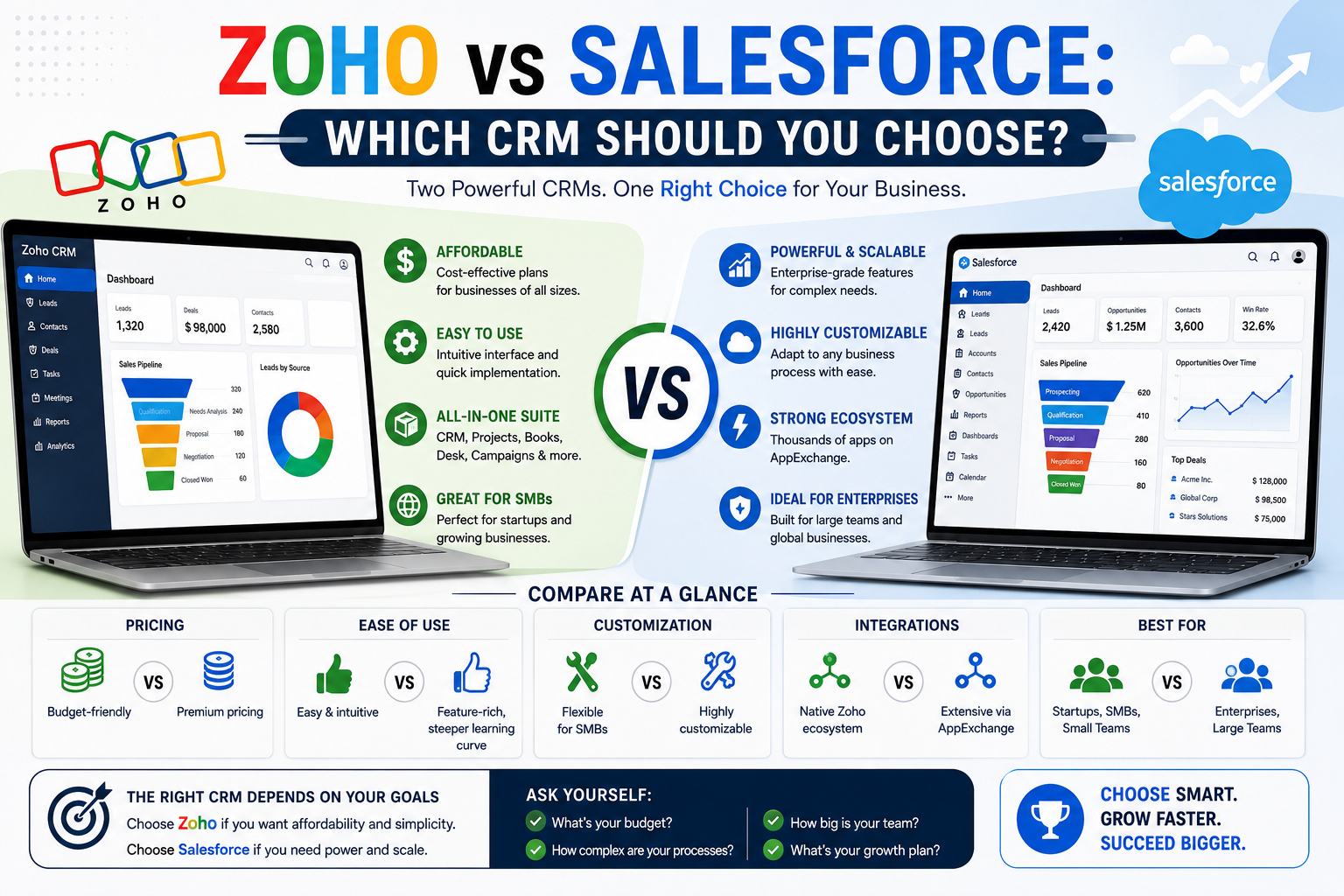
Zoho CRM and Salesforce sit at very different points on the price-versus-complexity spectrum, and the “better” platform genuinely depends on your organization’s size, budget, and customization needs. Salesforce is the enterprise-grade standard with the deepest customization and largest ecosystem; Zoho offers a substantially more affordable, simpler alternative that covers the core CRM needs of most small and mid-sized businesses well. This guide compares both platforms directly to help you choose.
Quick Comparison Overview
Salesforce is the market-leading CRM platform, known for deep customization, an extensive third-party app ecosystem (AppExchange), and enterprise-scale capability across sales, service, marketing, and commerce. It comes with a correspondingly higher price point and implementation complexity.
Zoho CRM is part of the broader Zoho suite of business applications, offering solid core CRM functionality — pipeline management, automation, reporting — at meaningfully lower per-user pricing, with a simpler setup process that often doesn’t require a dedicated implementation partner.
Pricing Comparison
Zoho CRM’s per-user pricing is generally substantially lower than Salesforce’s equivalent tiers across comparable functionality levels, making cost one of the most significant differentiators between the two platforms, particularly for small and mid-sized businesses evaluating total cost of ownership rather than just feature checklists.
Salesforce’s pricing, spread across Starter, Professional, Enterprise, and Unlimited tiers, climbs significantly at higher tiers where the platform’s deeper automation and customization capabilities become available — costs that are often justified for larger, more complex sales organizations but can represent significant overpayment for smaller teams with simpler needs.
Feature Comparison
Ease of Setup and Use
Zoho CRM is generally considered easier to configure without dedicated administrative or technical resources, with a more approachable interface for teams setting up their CRM independently. Salesforce’s greater configurability comes with a steeper learning curve, and most organizations beyond a very small team size benefit from a certified implementation partner to configure it properly.
Customization Depth
Salesforce offers substantially deeper customization capability — custom objects, complex automation via Flow Builder, and extensive API access for building entirely custom functionality on top of the core platform. Zoho CRM supports meaningful customization (custom fields, workflow automation, some custom modules) but doesn’t match Salesforce’s ceiling for highly complex, bespoke configurations.
Third-Party Integration Ecosystem
Salesforce’s AppExchange offers a significantly larger ecosystem of third-party integrations and add-on applications than Zoho’s marketplace, which matters most for organizations with specific niche integration needs that require a pre-built connector rather than custom API work.
Reporting and Analytics
Both platforms offer solid built-in reporting, with Salesforce generally providing deeper, more customizable analytics at higher tiers (particularly with Einstein Analytics/Tableau CRM add-ons), while Zoho’s reporting is generally sufficient for standard sales reporting needs without requiring premium add-ons.
Automation Capability
Salesforce’s Flow Builder offers more sophisticated, complex automation logic than Zoho’s workflow automation tools, relevant primarily for organizations with genuinely complex, multi-branch business processes that need to be automated within the CRM itself.
Mobile Experience
Both platforms offer capable mobile apps; Zoho’s mobile app is often praised for strong offline functionality and location-based features, particularly useful for field sales teams, while Salesforce’s mobile app offers closer feature parity with its more extensive desktop platform.
Ecosystem Considerations
Zoho’s Broader Suite
One advantage specific to Zoho CRM is its integration with the broader Zoho One suite — accounting (Zoho Books), email (Zoho Mail), project management (Zoho Projects), and dozens of other business applications that share data natively. Businesses already using or considering multiple Zoho products may find significant efficiency in this unified ecosystem compared to integrating separate best-of-breed tools.
Salesforce’s Partner and Developer Ecosystem
Salesforce’s much larger market share has created an extensive ecosystem of certified implementation partners, developers, and pre-built integrations, which can be a meaningful advantage for larger organizations needing specialized expertise or industry-specific solutions (via Salesforce’s various “industry clouds”).
Which Platform Fits Which Business
Choose Zoho CRM If:
- You’re a small to mid-sized business prioritizing cost-effectiveness and straightforward setup
- Your sales process is relatively standard without highly complex, bespoke automation needs
- You’re already using or interested in other Zoho business applications
- You don’t have dedicated technical/admin resources for CRM configuration and want something your team can set up independently
Choose Salesforce If:
- You’re a larger organization with complex, multi-department sales and service processes
- You need deep customization capability that goes beyond configuration into genuinely custom application logic
- You require specific industry-cloud functionality (financial services, healthcare, communications) that Salesforce offers and Zoho doesn’t match
- You have budget for both licensing and professional implementation services
Migration Considerations
Businesses do migrate in both directions — some growing companies move from Zoho to Salesforce as their complexity increases and they need deeper customization, while others move from Salesforce to Zoho after determining they’re overpaying for enterprise capability they don’t fully use. Key migration considerations include:
- Data export/import — both platforms support data export, though field mapping between different data models requires manual reconciliation
- Custom workflow rebuilding — automation, custom fields, and validation rules generally need to be recreated rather than directly ported
- Integration reconfiguration — connected email, calendar, and third-party tools need to be reconnected to the new platform
- Team retraining — even with broadly similar core CRM concepts, interface and workflow differences require some retraining
Total Cost of Ownership: Beyond List Price
When comparing Zoho and Salesforce, list price per user is only part of the picture. Salesforce implementations more commonly require professional services for setup, which adds meaningfully to first-year cost even though it’s not reflected in the per-user pricing page. Zoho’s simpler setup process more often allows for internal configuration without professional services, which can make its effective total cost advantage even larger than the per-user price difference alone suggests — though highly complex Zoho deployments can still benefit from professional implementation help.
Frequently Asked Questions
Is Zoho CRM as good as Salesforce? For standard sales pipeline management and typical small-to-mid-sized business needs, Zoho CRM covers the core functionality well at a substantially lower cost. Salesforce’s advantage becomes more pronounced for larger organizations needing deep customization, complex automation, or specific industry-cloud functionality that Zoho doesn’t match.
Why is Salesforce more expensive than Zoho? Salesforce’s higher pricing reflects its deeper customization capability, larger third-party ecosystem, more extensive reporting and AI features at higher tiers, and its position as the enterprise-scale market leader — costs that are justified for organizations that actually use that additional capability, but can represent overpayment for simpler use cases.
Can I switch from Salesforce to Zoho CRM (or vice versa) without losing data? Yes, both platforms support data export and import, though migrating between them requires manual field mapping and rebuilding of custom workflows and automation, since these aren’t directly portable between different CRM data models.
Is Zoho CRM good for a growing sales team? Yes, for many growing teams, particularly those without highly complex or unusual sales processes. Some organizations do eventually outgrow Zoho’s customization ceiling as their processes become more complex, at which point evaluating a migration to Salesforce or another more customizable platform becomes worth considering.
Does Zoho CRM integrate with other business tools? Yes, Zoho CRM integrates with the broader Zoho One suite of business applications natively, and also offers integrations with common third-party tools, though its overall integration ecosystem is smaller than Salesforce’s extensive AppExchange marketplace.
Which CRM is easier to set up without a consultant? Zoho CRM is generally considered easier for internal teams to configure independently, given its more approachable interface and lower overall complexity. Salesforce’s greater configurability typically benefits from professional implementation support, even for straightforward use cases, once you move beyond the most basic configuration.