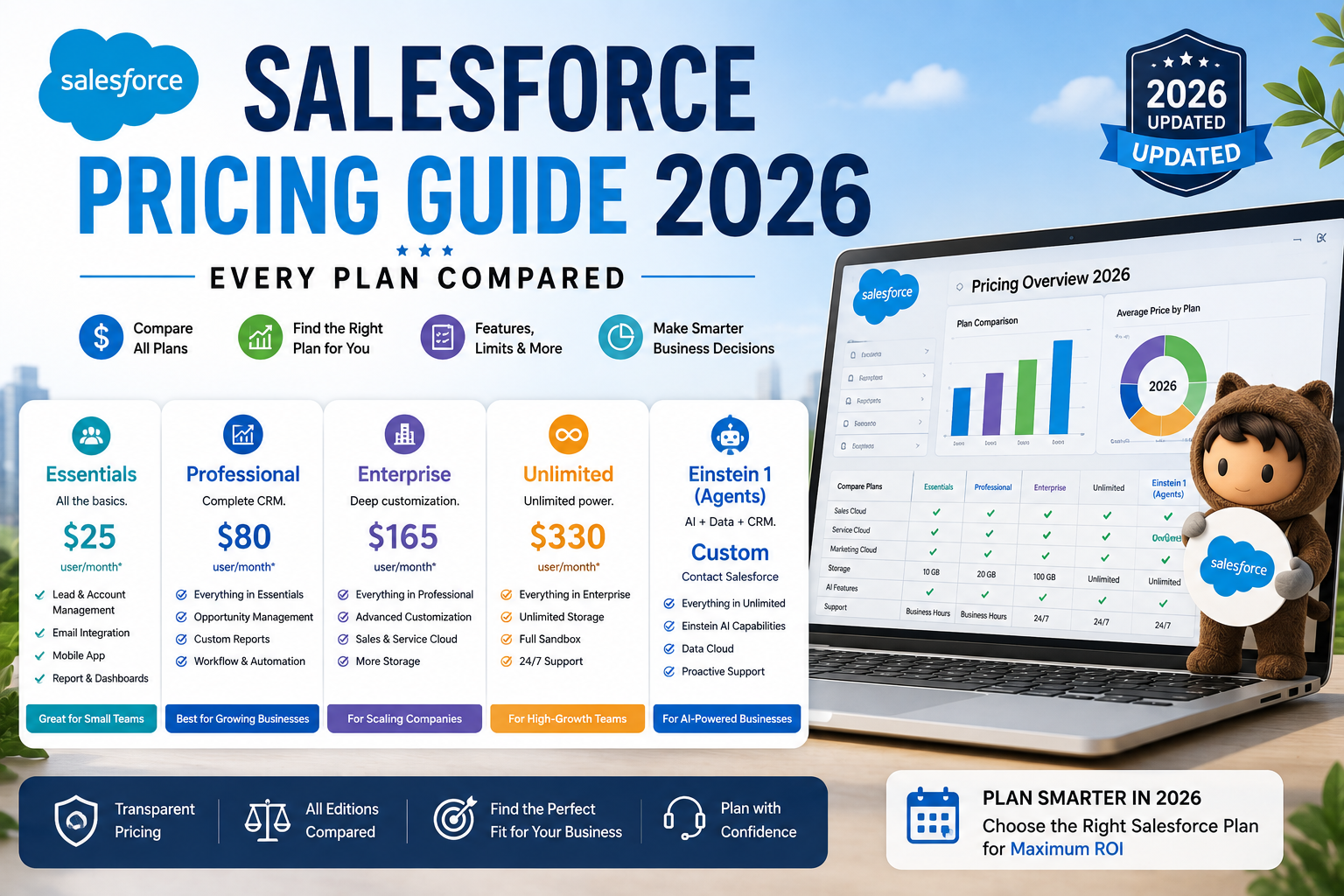
Salesforce is the most widely adopted CRM platform in the world, but its pricing structure is notoriously complex — split across multiple “clouds” (Sales, Service, Marketing, Commerce), each with its own tiered plans, add-ons, and per-user licensing. This guide breaks down current Salesforce pricing across its major products, explains the hidden costs that don’t show up on the pricing page, and helps you estimate a realistic total cost for your organization.
How Salesforce Pricing Is Structured
Unlike many SaaS products with a single pricing page, Salesforce prices each of its major clouds separately:
- Sales Cloud — core sales pipeline and opportunity management
- Service Cloud — customer support and case management
- Marketing Cloud — email, SMS, and multi-channel marketing automation
- Commerce Cloud — e-commerce platform
- Salesforce Starter Suite — a simplified, lower-cost bundle combining basic sales, service, and marketing functionality for small businesses
Most plans are billed per user, per month, with pricing typically higher when billed month-to-month versus an annual contract. Enterprise and unlimited tiers often require custom quotes, especially once add-ons and implementation services are factored in.
Sales Cloud Pricing Tiers
Salesforce Sales Cloud is generally offered across several tiers:
- Starter — a simplified entry point aimed at very small teams, with basic contact, lead, and opportunity management
- Professional — adds more robust pipeline management, forecasting, and quote functionality, aimed at growing sales teams
- Enterprise — adds workflow automation, advanced reporting, and deeper customization capability, aimed at larger or more complex sales organizations
- Unlimited — the top tier, adding premier support, unlimited custom app development, and the highest configuration ceiling
Each tier up typically unlocks meaningfully more automation, customization, and support — the jump from Professional to Enterprise in particular is where most mid-sized companies find the workflow automation (via Flow Builder) they actually need for scaling sales operations.
Service Cloud Pricing
Service Cloud follows a broadly similar tier structure to Sales Cloud — Starter, Professional, Enterprise, and Unlimited — with pricing scaled to case management complexity, omnichannel routing capability, and AI-powered service tools available at higher tiers. Many organizations license Sales Cloud and Service Cloud together for a combined per-user rate, since sales and support teams often need visibility into the same customer records.
Marketing Cloud Pricing
Marketing Cloud pricing is structured differently from Sales and Service Cloud — rather than a simple per-user model, pricing typically scales based on contact/subscriber volume, the specific marketing channels used (email, SMS, push, social), and which tier of functionality (Growth, Advanced, Premium editions) you need. This makes Marketing Cloud pricing harder to estimate from a published price list alone, and most mid-size to enterprise deployments require a custom quote based on database size and channel mix.
Commerce Cloud Pricing
Salesforce Commerce Cloud pricing is generally structured around a percentage of gross merchandise value (GMV) processed through the platform, rather than a flat per-user fee, reflecting its positioning as an enterprise e-commerce platform rather than a simple software license. This revenue-share model means Commerce Cloud costs scale directly with your business’s online sales volume, which is worth modeling carefully against a fixed-fee e-commerce platform if you’re comparing total cost of ownership.
Salesforce Starter Suite
The Starter Suite is Salesforce’s simplified, lower-cost entry point aimed specifically at small businesses that want basic sales, service, and marketing functionality bundled together without navigating the full complexity of separate cloud licensing. It offers a single flat per-user monthly price with core CRM, email marketing, and case management functionality, trading some of the deep customization of the full Enterprise-tier products for simplicity and lower cost.
Salesforce Customer 360 and Connect Pricing
“Customer 360” isn’t a separate product with its own price tag — it’s Salesforce’s branding for the unified data layer connecting its various clouds together. Pricing for a Customer 360 implementation is effectively the sum of whichever individual clouds (Sales, Service, Marketing, Commerce) you license, plus any additional integration or data platform add-ons (like Salesforce Connect or MuleSoft) needed to unify data across systems.
Hidden Costs Beyond the Sticker Price
The published per-user pricing rarely reflects the true total cost of a Salesforce deployment. Common additional costs include:
Implementation and Onboarding
Most organizations beyond the smallest teams engage a Salesforce implementation partner or certified consultant to configure the platform, migrate data, and build custom workflows — this can range from a few thousand dollars for a simple setup to six figures for a complex enterprise rollout.
Additional User Licenses
Per-user pricing means costs scale linearly (or faster, with tier upgrades) as your team grows — it’s worth modeling your expected headcount growth over 2-3 years, not just your current team size, when estimating total cost.
Storage Overages
Salesforce includes a baseline amount of data and file storage per org, with additional storage billed separately once you exceed it — a consideration for organizations with large attachment volumes or long data retention requirements.
AppExchange Add-Ons
Many common functionality gaps (advanced e-signature, specialized reporting, industry-specific tools) are filled by third-party apps from the Salesforce AppExchange, each with its own separate subscription cost on top of core Salesforce licensing.
Sandbox Environments
Additional sandbox (testing/development) environments beyond what’s included in your base plan carry additional cost, relevant for organizations doing frequent custom development or testing.
Training and Change Management
Beyond initial implementation, ongoing user training and change management — particularly for large sales or service teams — represents a real, often underbudgeted cost of a successful Salesforce rollout.
Salesforce vs. Zoho: A Quick Cost Comparison
Zoho CRM is frequently evaluated as a lower-cost alternative to Salesforce, particularly by small and mid-sized businesses. Zoho’s per-user pricing is generally substantially lower than Salesforce’s equivalent tiers, and its interface is often considered simpler to configure without dedicated admin resources. The tradeoff is a smaller third-party integration ecosystem and less deep customization capability at scale — Salesforce remains the stronger choice for organizations with complex, highly customized sales processes or specific industry compliance needs, while Zoho is often the more cost-effective choice for straightforward CRM needs without extensive customization requirements.
How to Estimate Your Realistic Salesforce Cost
- Start with your actual required cloud(s) and tier. Don’t default to Enterprise — many organizations overpay for automation and customization capability they don’t use.
- Model 2-3 years of headcount growth, not just your current team size, since per-user costs compound.
- Budget separately for implementation. Get quotes from at least two certified implementation partners rather than assuming DIY setup is realistic for your complexity level.
- Account for likely AppExchange add-ons based on functionality gaps you’ve already identified in your requirements.
- Factor in annual vs. month-to-month pricing differences — annual contracts typically offer meaningfully lower effective rates.
- Ask directly about small business pricing eligibility if your organization qualifies, since Salesforce does offer reduced pricing paths for smaller teams through the Starter Suite.
Frequently Asked Questions
How much does Salesforce cost for a small business? Salesforce Starter Suite is specifically designed for small businesses and offers a simplified, lower-cost per-user monthly price bundling basic sales, service, and marketing functionality. Small businesses that need more customization may still opt for Sales Cloud Professional, at a higher per-user cost than Starter Suite.
What is the cheapest Salesforce plan? The Starter Suite is generally Salesforce’s lowest-cost entry point, aimed at small businesses needing basic CRM functionality without the customization depth of Professional, Enterprise, or Unlimited tiers.
Does Salesforce pricing include implementation? No. Published per-user pricing covers software licensing only. Implementation, data migration, custom configuration, and training are separate costs, typically handled either in-house or through a certified Salesforce implementation partner.
Is Salesforce billed monthly or annually? Salesforce is typically sold via annual contracts, though month-to-month billing options exist at a higher effective per-user rate for some plans. Annual commitments generally offer better pricing.
How is Salesforce Marketing Cloud priced differently from Sales Cloud? Sales Cloud uses a straightforward per-user, per-month pricing model. Marketing Cloud pricing instead scales primarily with contact/subscriber database size and the specific marketing channels used, making it harder to estimate from list pricing alone without a custom quote.
Is Zoho CRM cheaper than Salesforce? Generally yes — Zoho CRM’s per-user pricing is typically substantially lower than Salesforce’s comparable tiers, though Salesforce offers deeper customization, a larger integration ecosystem, and stronger enterprise-scale features that may justify the cost difference for more complex organizations.